
USFans Warehouse: Use Stage Labels That Survive a Handoff
A USFans warehouse row should show how an item moved from submitted choice to received item and, only later, to parcel input. Labeling each stage prevents an order link, a QC view and a carton quote from being treated as the same fact.
For an outfit comparison, open the grey Essentials set details on USFans. Check the listing's included pieces and selected option rather than assuming every set contains the same items. Keep that selection separate from evidence of what later arrives.
Record item reference, selected option, quantity, receipt state, evidence source and date. In your own notes, distinguish awaiting receipt, received, option mismatch, missing and ready for packing; these are note-taking labels, not a claimed list of USFans interface statuses. If the account view does not clarify the stage, preserve the last confirmed information and send one specific question through USFans Support.
Use USFans QC Photos for visible item evidence and USFans Size Guide for defined measurements. When the item is accepted into a parcel, give the package its own reference, packed weight and dimensions in USFans Shipping Calculator. Keep those carton fields out of the product row.
Resolve an item question before using it as a parcel input
A received-item photo can help you compare the visible colour, label or included pieces against your saved selection. It does not by itself show that every item in a multi-item order has arrived. Check each item separately. For a set, compare the components shown with the listing and your selected option; do not infer a missing piece from an image that simply leaves part of the package outside the frame.
If a detail is unclear, describe the exact observation you need. For example: “Does the received size label match the selected size?” is more actionable than “Please check everything.” Keep any order or account reference within the private support conversation. A publicly shared image should not expose addresses, parcel labels or payment information.
Separate storage decisions from shipping decisions
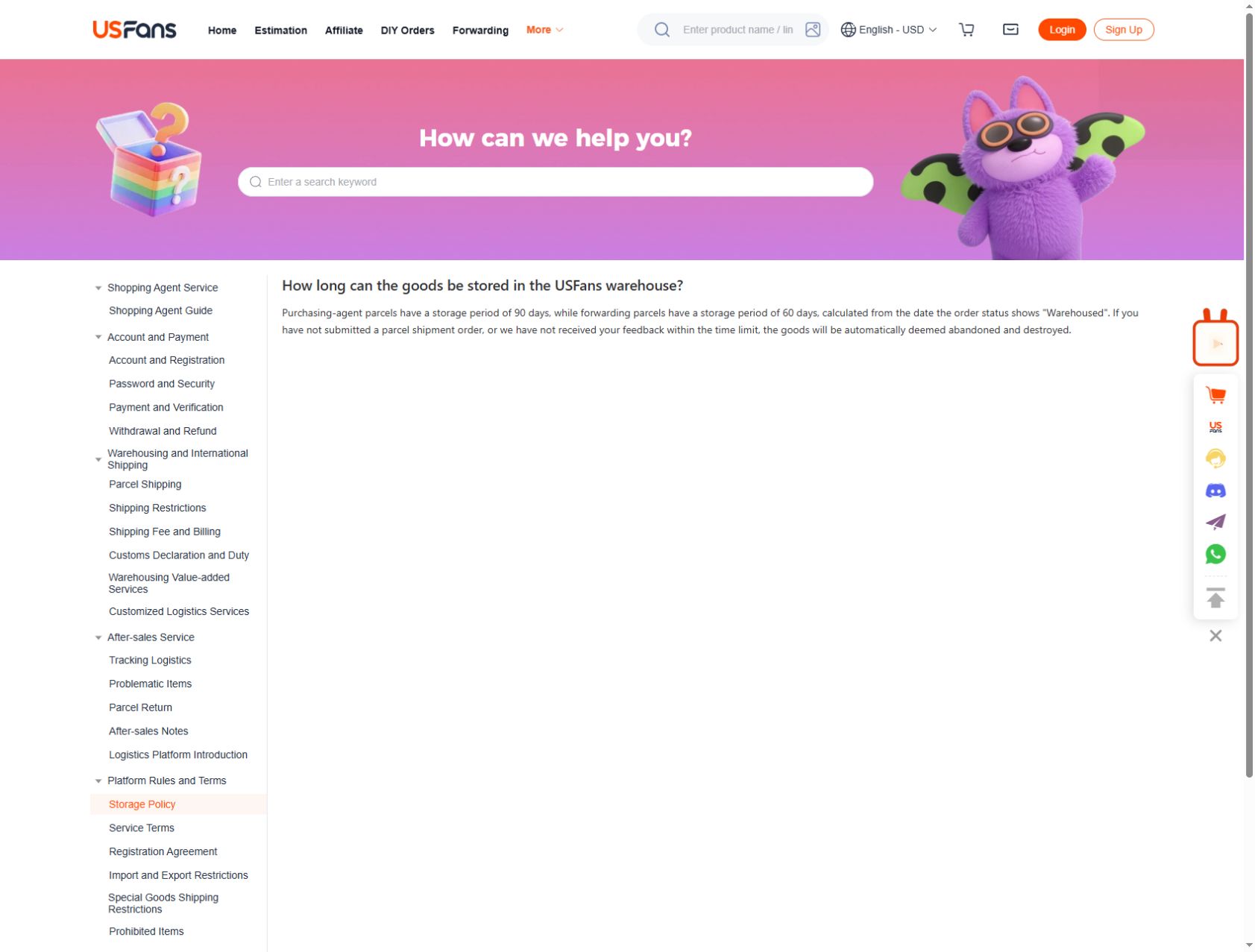
USFans' storage page, checked on 30 September 2026, lists 90 days for purchasing-agent parcels and 60 days for forwarding parcels, counted from the date the order shows “Warehoused.” Identify the service category before using either period. The clock does not start when you first save a product link or decide to combine items.
The page warns that goods may be treated as abandoned and destroyed if no shipment order has been submitted or feedback received within the time limit. Check the date and conditions for your own items before waiting for another purchase to arrive. The period alone does not establish that an extension is available or free. If you need more time, ask about the specific item before its deadline.
If you are considering a return, read the applicable conditions promptly; a warehouse receipt does not establish that a return request will be approved. Use the returns guide to organise the item-specific question.
For consolidation, link each item to the parcel in your notes. If packaging or a split changes weight or dimensions, add a dated observation and retain the earlier measurement. The final carton has its own measurements; adding product dimensions together is not a substitute for measuring the packed parcel.
Before moving on, confirm the selected items, variants and quantities, review unresolved QC questions, and identify what action you intend to take next. This keeps “received” distinct from your decision that the item is suitable to include in a shipment.